Diorite Pixel Art Editor: Your Ultimate Pixel Art Creation Tool
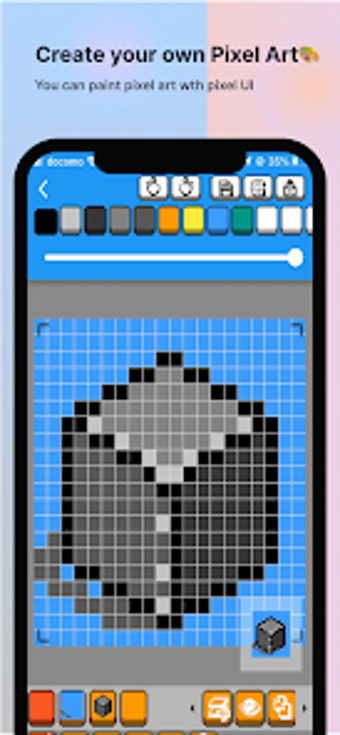
Diorite Pixel Art Editor is a powerful drawing app designed for Android users who are passionate about creating pixel art. Developed by mikanbox, this free app offers a seamless interface and a range of features to enhance your pixel art experience. Whether you're a professional artist or just enjoy doodling in your spare time, Diorite is the perfect tool for you.
With Diorite, you can take advantage of various features to bring your pixel art to life. The app allows you to work with multiple layers, giving you the flexibility to create complex designs. You can also use transparent colors to add depth and dimension to your artwork. And with the undo and redo functions, you can easily correct any mistakes or experiment with different ideas.
One of the standout features of Diorite is its custom color palettes. You can create and save your own color combinations, making it easy to achieve the perfect look for your pixel art. Additionally, the app allows you to zoom in on the editing screen, ensuring precise control over every pixel. You can also specify the canvas size to suit your needs.
Diorite offers unlimited file storage, so you can save as many pixel art creations as you like. And when you're ready to share your artwork with the world, you can export it as image files. Whether you want to showcase your pixel art on social media or print it out for display, Diorite has got you covered.
Overall, Diorite Pixel Art Editor is a must-have app for anyone interested in pixel art. With its user-friendly interface and powerful features, it provides a seamless and enjoyable drawing experience. Download Diorite today and unleash your creativity!